


Your new prototype arrives. You test it. It fails. The thin wall on your 3D print cracks. The internal corner on your CNC part has a weird radius that was not in your design.

Your first instinct might be to blame the manufacturer. But in most cases, the root cause of the failure was not in the factory. It was locked into your CAD file from the very beginning.
Most prototype failures are design failures. They happen because the design was not optimized for the chosen manufacturing process. A good Rapid prototyping design is not just a good design. It is a manufacturable design. This guide will explore the rules of this vital discipline.
The Golden Rule: Design for the Process
Designing for CNC Machining
Designing for 3D Printing
Your First Line of Defense
The Golden Rule: Design for the Process

There is no such thing as a universal "good design." A design that is perfect for 3D printing can be impossible to CNC machine. A design that is perfect for machining can be a nightmare to injection mold.
This is the golden rule of Design for Manufacturability (DFM). You must design for your specific manufacturing process.
The world of Rapid Prototyping offers many different processes. Each has its own unique set of rules, strengths, and limitations. A smart designer understands these rules and uses them to their advantage.
Designing for CNC Machining
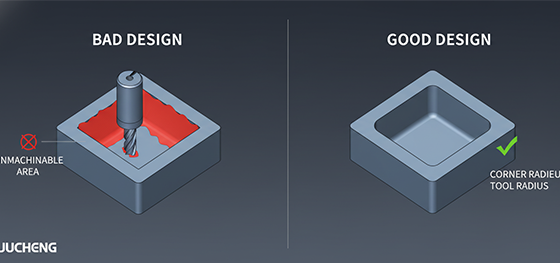
CNC machining is a subtractive process. It uses a spinning cutting tool to carve your part from a solid block. This simple fact creates several key design rules.
The most important rule is about internal corners. A spinning tool is round. Therefore, it can never create a perfectly sharp internal corner. Every internal corner in your design will have a radius left by the tool.
A good Rapid prototyping design for CNC acknowledges this. You should always add a radius to your internal corners that is larger than the radius of the cutting tool. This allows the tool to move smoothly and create a clean finish.
Another key rule is tool access. If a feature is in a deep, narrow pocket, the cutting tool might not be able to reach it. You must design your part with enough clearance for the tools to do their work.
Designing for 3D Printing
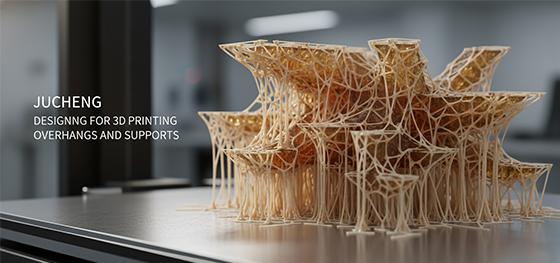
3D printing is an additive process. It builds your part in layers. This creates a completely different set of design rules.
The most important rule is to think about "overhangs." A 3D printer cannot print in mid-air. Any feature that extends out at a steep angle (usually more than 45 degrees) will need a "support structure" built underneath it. These supports are then removed after the print is finished.
A smart designer will try to orient their part or even change the design to minimize the need for these supports. Supports add time to the print and can leave small marks on the surface where they are removed.
Another key rule for 3D printing is minimum wall thickness. Every process has a limit to how thin a feature it can create. For SLA, this might be around 0.5mm. Designing a wall that is thinner than this will cause the print to fail.
Finally, if your part is hollow (like for SLA), you must design "escape holes." These allow the uncured liquid resin trapped inside your part to drain out. Without them, the part could crack or even explode over time.
Your First Line of Defense

These rules can be complex. Most product designers are experts in function and aesthetics, not in the fine details of every manufacturing process.
This is why your first line of defense against a failed prototype is a good manufacturing partner.
At JUCHENG, our Free DFM Review is a core part of our service. Our engineers are your expert partners. We speak the language of all these different processes.
We will analyze your Rapid prototyping design. We will check it for all these common issues. We will provide a clear, detailed report with our suggestions. This collaborative process catches problems before they become expensive, physical failures. It is the secret to a smooth and successful prototyping journey.